

Image on Pinterest
A drag and drop website builder is a visual web design tool that lets you create, customize, and publish a website without writing a single line of code. Instead of working in a code editor, you select pre-built elements from a sidebar, drag them onto a live canvas, and position them exactly where you want. The platform generates the underlying HTML and CSS automatically. If you have spent hours staring at blank code or watching tutorials that never quite get you to a live page, a drag and drop website builder removes that barrier and delivers a published site in a fraction of the time.
Key Takeaways
A drag and drop website builder lets you design and publish a professional site without writing any code.
True freeform editors like Wix give pixel-level freedom, while block-based editors like Squarespace prioritize structural consistency.
Most free plans include platform branding or ads, and self-hosted open-source setups are the only genuinely ad-free option.
Webflow and Elementor on WordPress offer significantly deeper technical SEO control than hosted SaaS builders.
The website builder market is projected to hit $6.38 billion in 2026, making drag and drop the new default for web creation.
What Is a Drag and Drop Website Builder, Exactly?
The core mechanic is straightforward., you work inside a WYSIWYG editor, which stands for "what you see is what you get," meaning the design you build in the editor is precisely what visitors see when they land on your published page. Every element, whether it is a heading, a photo, a contact form, or a pricing table, is a pre-coded block that you move, resize, and style through point-and-click controls rather than written markup. The term "no-code drag and drop website builder" describes this same category, with an emphasis on the fact that the interaction is entirely visual and the platform handles all structural code generation on your behalf.
According to a February 2026 report from The Business Research Company, the website builder software market is projected to grow from $5.79 billion in 2025 to $6.38 billion in 2026, driven in part by the continued adoption of drag and drop platforms by small businesses, solo creators, and marketing teams building landing pages at scale.
How Does a Drag and Drop Website Builder Work?
The process follows four steps that most first-time users complete in a single session.
You begin by choosing a pre-built template that fits your industry or goal.
Next, you open the element panel and select the block you want to add, whether that is a text section, a gallery, a button, or an embedded form.
Then you drag that element onto the canvas and drop it into position on the page.
Finally, you preview the design across desktop and mobile breakpoints and publish with a single click.
The drag and drop website builder handles hosting, SSL security, and mobile rendering in the background, so you are never configuring a server or writing a deployment script yourself.
True Drag and Drop Editors vs. Block-Based Editors
Not every visual builder works the same way, and the distinction becomes significant when you run into design constraints months after launch.
True Drag and Drop Editors Such as Wix, Webflow, and Elementor
A true drag and drop website builder gives you freeform positional control, meaning you can place any element anywhere on the canvas without being restricted to a predefined grid or section structure. Wix lets you drag an image to any position on the page at the pixel level. Webflow operates on CSS grid principles but gives you visual control over every layout parameter. Elementor, which runs on WordPress and powers over 21 million websites globally, gives the same freeform control while keeping your site on a fully self-hosted, open-source platform.
The advantage of this type of drag and drop website builder is design flexibility and creative freedom. The trade-off is that freeform positioning requires more judgment from the user, and it is easier to accidentally create layouts that behave inconsistently on smaller screens.
Block-Based or Section-Based Editors Such as Squarespace and WordPress Gutenberg
A block-based editor, by contrast, snaps content into predefined sections that stack vertically down the page. Squarespace's Fluid Engine uses this structured approach, and WordPress's native Gutenberg editor works on the same principle. These editors are harder to misuse because elements cannot be dragged outside their parent containers, which keeps layouts consistent across screen sizes.
The disadvantage is that creative freedom is limited, and designers who need precise control over spacing, layering, or overlapping elements typically find block-based editors constraining. Neither approach is universally superior, and your choice of drag and drop website builder should align with how much layout control your project genuinely requires.
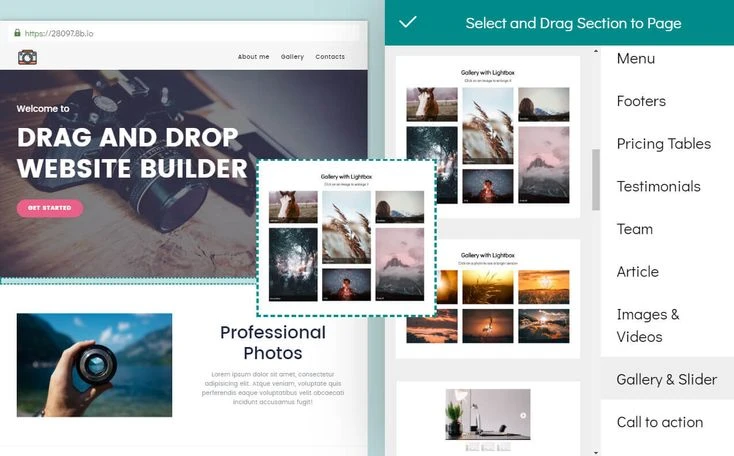
Image on Pinterest
Who Should Actually Use a Drag and Drop Website Builder?
Small business owners, freelancers, nonprofit teams, content creators, and marketing departments building campaign landing pages are the core audience for a drag and drop website builder. Research from UIThings (2026) shows that 58% of startups launched in 2023 used drag and drop platforms within their first 90 days of operation, which reflects how decisively these tools have become the default starting point for early-stage digital presence.
At Plexopages, we cover no-code web tools and content strategy for independent publishers and growing businesses. What we consistently find when testing builders across different use cases is that the choice of platform matters far less than most comparison guides suggest.
The gap between a well-configured Wix site and a well-configured Squarespace site, in terms of search visibility and user experience quality, is consistently smaller than the gap between a builder used with a clear content strategy and a builder used without one. The drag and drop website builder is the tool, and the thinking behind the site is what determines results.
Is a Free Drag and Drop Website Builder Good Enough?
Most major platforms offer a free tier, and the honest assessment is that free plans work for learning, prototyping, and very low-stakes projects, but they are not adequate for professional use without caveats. Wix's free plan shows Wix branding and restricts you to a Wix subdomain, Webflow's free plan limits you to two pages, and Weebly's free plan includes Square branding throughout.
If you need a drag and drop website builder that is free in the sense of carrying no monthly subscription fee and no platform branding, the only reliable route is an open-source, self-hosted setup. Research from UIThings (2026) also confirms that the business segment accounted for 57.35% of the website builder market in 2025, which indicates that the majority of serious users do move beyond free tiers as their requirements grow.
What Are the Best Open Source Drag and Drop Website Builder Options?
A drag and drop website builder open source option gives you the ability to self-host your site, modify the underlying code, and avoid recurring subscription fees entirely.
The most widely used approach is WordPress.org combined with the free tier of Elementor, which together produce a fully functional drag and drop environment with no platform lock-in and no forced branding. GrapesJS, a BSD-licensed JavaScript framework with over 25,000 GitHub stars, is used by developers to embed drag and drop builder functionality directly into their own applications and SaaS products. Webstudio is an open-source visual builder that outputs clean semantic HTML and is widely described as the closest self-hosted alternative to Webflow's level of design control.

Image on Pinterest
At Plexopages, our coverage of no-code tools and web builders is grounded in exactly this kind of practical decision-making, not abstract feature comparisons. When you understand what a drag and drop website builder actually does at the structural level, choosing the right one becomes a considerably shorter and less stressful conversation.
Start Building With the Right Tool for Your Goals
Plexopages is your go-to destination for everything drag-and-drop website builders. We help you cut through the noise with clear guidance so you can choose the right platform with confidence.
Ready to build smarter? Explore Plexopages and find the perfect tool for your project.
FAQ
What is a drag and drop website builder in plain language?
A drag and drop website builder is a visual tool that lets you design and publish a website by placing pre-built elements onto a canvas, without writing code. The platform generates HTML and CSS from your visual choices automatically, so what you see in the editor is exactly what visitors see on the published page.
What is the best drag and drop website builder for beginners in 2026?
Wix is widely regarded as the most accessible drag and drop website builder for beginners because it combines a freeform editor with over 800 templates and an AI setup assistant. Hostinger's website builder is a strong alternative at a lower price point, and it includes an AI content writer and a straightforward onboarding flow suited to first-time site builders.
Is there a free drag and drop website builder that does not show ads?
Most free-tier platforms display branding or advertising on your published site. The most reliable way to get a genuinely ad-free drag and drop website builder at no cost is to use WordPress.org with Elementor Free on your own hosting plan, which eliminates subscription fees and platform branding without restricting your design options.
Are drag and drop website builders good for SEO?
A drag and drop website builder can support solid SEO when it generates clean code, allows full control over meta titles, descriptions, and heading structures, and does not compromise Core Web Vitals scores. Webflow and Elementor on WordPress offer the highest level of technical SEO control. Hosted platforms like Wix and Squarespace cover the basics competently but limit advanced schema markup and server-level configuration.
What is the difference between a drag and drop website builder and a block editor?
A drag and drop website builder gives you freeform positional control, meaning you can place elements anywhere on the canvas. A block editor like WordPress Gutenberg or Squarespace Fluid Engine restricts elements to predefined stacking sections. Drag and drop offers greater creative flexibility, while block editors produce more structurally consistent layouts with less risk of breaking on mobile screens.